Google AI Ultra 20x Create more. Optimise your budget.
Use Gemini, Flow, NotebookLM and 30 TB of storage with Google AI Ultra 20x. Pick a Family member seat, a Full Family for five, or a Personal Ultra 20x account of your own.
Approximate USD prices cover the full term and are converted from VND at 25,800 VND/USD (25 Oct 2026). Full Family prices cover all 5 members. Confirm the final amount and payment method in @chugax_gl_bot before paying.
1 MEMBER · RANDOM GROUP1 member: you take one member place in a Google family group. Random group: the shop places you in one of its family groups; you do not choose the group.
Google AI Ultra 20x
Family member · 1 month
Full-term price≈ $16.71-month term
For 1 members
25,000 credits/month
Veo 3, Omni Flash
Antigravity
Warranty for the full 1-month purchased term.
Plan details
For your own email, joining a Family managed by the shop.
Shared by the whole Family
Your own email · no email change needed.
Shared Family credits, not a separate allowance for each member.
1 MEMBER · RANDOM GROUP1 member: you take one member place in a Google family group. Random group: the shop places you in one of its family groups; you do not choose the group.
Google AI Ultra 20x
Family member · 3 months
Full-term price≈ $46.53-month term
For 1 members
25,000 credits/month
Veo 3, Omni Flash
Antigravity
Warranty for the full 3-month purchased term.
Plan details
For your own email, joining a Family managed by the shop.
Shared by the whole Family
Your own email · no email change needed.
Shared Family credits, not a separate allowance for each member.
1 MEMBER · RANDOM GROUP1 member: you take one member place in a Google family group. Random group: the shop places you in one of its family groups; you do not choose the group.
Google AI Ultra 20x
Family member · 6 months
Full-term price≈ $69.86-month term
For 1 members
25,000 credits/month
Veo 3, Omni Flash
Antigravity
Warranty for the full 6-month purchased term.
Plan details
For your own email, joining a Family managed by the shop.
Shared by the whole Family
Your own email · no email change needed.
Shared Family credits, not a separate allowance for each member.
1 MEMBER · SHARED CREDITS · IN BATCHESShared pool for the shop-managed Family: 25,000-credit batches, refilled when empty up to 100,000. The plan ends after 1 month or when all 100,000 credits are used, whichever comes first.
Google AI Ultra 20x
Veo 3 · 100,000 credits · 1 month
Full-term price≈ $116.31-month term
For 1 members
100,000 credits/month
Veo 3, Omni Flash
Covered until all 100,000 credits are used or the month ends, whichever comes first.
Plan details
Use your own email to join a Family managed by the shop. Credits are a pool shared by the whole Family, delivered in 25,000-credit batches; the shop refills each batch when it runs out, up to 100,000 credits. The plan ends after 1 month or when all 100,000 credits are used, whichever comes first.
25,000 per batch · shared Family pool · refilled when empty, up to 100,000
Your own email · no email change needed.
Shared pool for the shop-managed Family: 25,000-credit batches, refilled when empty up to 100,000. The plan ends after 1 month or when all 100,000 credits are used, whichever comes first.
5 MEMBERS · YOU OWN THE GROUPYou are the family manager: you add or remove up to 4 other members. The shop’s subscription account must stay in the group.
Google AI Ultra 20x
Full Family · 3 months
Full-term price≈ $162.83-month term
Total for all 5 members
25,000 credits/month
Veo 3, Omni Flash
Antigravity
Warranty for the full 3-month purchased term.
Plan details
Manage your Family and 4 other members.
Total Family pool · not multiplied by 5
1 Family manager + 4 of your members.
Keep the shop’s subscription account in the Family.
5 MEMBERS · YOU OWN THE GROUPYou are the family manager: you add or remove up to 4 other members. The shop’s subscription account must stay in the group.
Google AI Ultra 20x
Full Family · 6 months
Full-term price≈ $310.16-month term
Total for all 5 members
25,000 credits/month
Veo 3, Omni Flash
Antigravity
Warranty for the full 6-month purchased term.
Plan details
Manage your Family and 4 other members.
Total Family pool · not multiplied by 5
1 Family manager + 4 of your members.
Keep the shop’s subscription account in the Family.
5 MEMBERS · YOU OWN THE GROUPYou are the family manager: you add or remove up to 4 other members. The shop’s subscription account must stay in the group.
Google AI Ultra 20x
Full Family · 12 months
Full-term price≈ $465.112-month term
Total for all 5 members
25,000 credits/month
Veo 3, Omni Flash
Antigravity
Warranty for the full 12-month purchased term.
Plan details
Manage your Family and 4 other members.
Total Family pool · not multiplied by 5
1 Family manager + 4 of your members.
Keep the shop’s subscription account in the Family.
PERSONAL ULTRA 20x ACCOUNTA personal Google AI Ultra 20x account: you own the plan and can invite up to 5 more people into your family group to share the 25,000 monthly credits and 30 TB.
Google AI Ultra 20x
Personal Ultra 20x · 12 months
Full-term price≈ $658.912-month term
For 1 account
25,000 credits/month
Veo 3, Omni Flash
Antigravity
YouTube Premium
Google Cloud 100 USD/month
Google Colab 2,000 units/month
Covers the service plan only, not the account.
Plan details
Your own personal Google AI Ultra 20x account, preferably upgraded on the Gmail you already use.
You own it · invite up to 5 more people
Preferably upgraded on the Gmail you already use.
Adds YouTube Premium, zero-credit video (Veo 3.1 Lower Priority) and USD 100 Google Cloud credit a month.
1 MEMBER · UNLIMITED CREDIT1 member in a shop-managed family group. Unlimited Credit: when credits run out, the shop refills them, with no limit on refills.
Google AI Ultra 20x
Veo 3 · Unlimited Credit* · 1 month
Full-term price≈ $310.11-month term
For 1 members
Unlimited Credit · 10:00–21:00 GMT+7
Veo 3, Omni Flash
Shop-side issue: plan restored or unused time refunded.
Plan details
A shop-managed credit refill plan shared within the Family.
* The shop refills credits when they run out, within these hours
Your own email · no email change needed.
Shared Family credits, not a separate allowance for each member.
Refilled whenever credits run out (10:00–21:00, 2–3 hours between refills); each generation still uses credits.
5 MEMBERS · UNLIMITED CREDITYou are the family manager and add or remove members. Unlimited Credit: when credits run out, the shop refills them, with no limit on refills.
Google AI Ultra 20x
Full Family · Unlimited Credit* · 1 month
Full-term price≈ $1,550.41-month term
Total for all 5 members
Unlimited Credit · 10:00–21:00 GMT+7
Veo 3, Omni Flash
Antigravity
Shop-side issue: plan restored or unused time refunded.
Plan details
You manage the Family; 5 members share a credit pool the shop refills.
* The shop refills credits when they run out, within these hours
Your own email · no email change needed.
1 Family manager + 4 of your members.
Refilled whenever credits run out (10:00–21:00, 2–3 hours between refills); each generation still uses credits.
Every plan draws from one Family’s credit pool (up to 5 users); the pool is not multiplied by the number of members. 100,000-credit plan: Credits are a pool shared by the whole Family, delivered in 25,000-credit batches; the shop refills each batch when it runs out, up to 100,000 credits. The plan ends after 1 month or when all 100,000 credits are used, whichever comes first. The shop tracks credits used from when the bot says “Done”; ask the bot for the usage total. The Personal Ultra 20x 12-month plan: The 25,000 monthly credits and 30 TB belong to your plan; you can invite up to 5 more people into your family group to share them.
750,000 credits = 25,000 a day
Every day the Family pool resets to 25,000 credits. If you use them up, wait for the next day; unused credits do not roll over. 30 days add up to 750,000 credits.
Unlimited Credit means refills
The shop refills credits whenever they run out, with no monthly limit on refills, during 10:00–21:00 GMT+7, with 2–3 hours between consecutive refills. Each video still uses credits; outside those hours, the refill happens in the next working window.
Confirm the exact product before ordering
The 25,000 credits/month allowance applies only to the standard Family member and Full Family plans. The 750,000-credit plan resets to 25,000 credits daily, the 100,000-credit plan uses a shared Family pool, and Unlimited Credit plans are refilled whenever credits run out; both happen during 10:00–21:00 GMT+7, 2–3 hours apart. Open each plan to see its own conditions and warranty. The Personal Ultra 20x 12-month plan: The 25,000 monthly credits and 30 TB belong to your plan; you can invite up to 5 more people into your family group to share them. 100,000-credit plan: Credits are a pool shared by the whole Family, delivered in 25,000-credit batches; the shop refills each batch when it runs out, up to 100,000 credits. The plan ends after 1 month or when all 100,000 credits are used, whichever comes first. The shop tracks credits used from when the bot says “Done”; ask the bot for the usage total.
Open @chugax_gl_bot and select the matching product, member count and term. The bot confirms the payable amount; this page does not pass selections to the bot, create orders or collect payments automatically.
Shared Family plans do not include the credit-free Veo Lite / Lower Priority video model, and Unlimited Credit plans do not change this. Only the Personal Ultra 20x 12-month plan includes Veo 3.1 Lower Priority for video without spending credits.
100,000 credits/month · shared Family pool · 25,000 per batch, refilled when empty
Use your own email to join a Family managed by the shop. Credits are a pool shared by the whole Family, delivered in 25,000-credit batches; the shop refills each batch when it runs out, up to 100,000 credits. The plan ends after 1 month or when all 100,000 credits are used, whichever comes first. Tell the shop through the bot when credits are nearly out. Refills run 10:00–21:00 GMT+7, with 2–3 hours between refills. The shop tracks credits used from when the bot says “Done”; ask the bot for the usage total.
Join a shop-managed Family where up to 5 people share the credit pool; no email change needed. *When credits run out, tell the bot and the shop refills them within the hours above, 2–3 hours apart.
You manage the Family; all 5 members share a credit pool the shop refills whenever it runs out. *Within the hours above, 2–3 hours between refills; not 24/7.
USD prices are estimates converted from VND at 25,800 VND/USD on 25 Oct 2026. The Global bot confirms the final payable amount.
Why does a 5-member Full Family have 6 accounts in the Family?
The 5 customer members are 1 Family manager + 4 members. The shop’s subscription account occupies the remaining position and must stay in the group to maintain benefits.
Compare by member count, credit delivery and term. A Family’s credit pool is shared, not multiplied by the number of users.
SHARED BENEFITS · YOUR OWN ACCOUNT
What do you get with Ultra 20x?
Family member and Full Family share the benefits below. They differ mainly in account count and Family management, not in a separate Ultra subscription for each member.
20xGemini usage compared with Pro
25,000Flow credits/month · whole Family
30 TBShared storage · whole Family
Tools & features
6 tools, more ways to work
Scan the key features, then expand each card for usage conditions.
ASSISTANT & CREATION
Gemini
From an idea to finished content.
Write and analyze documents, images and code.
Generate and edit images with AI.
Deep Research for multi-source research.
Details & limits
The 20x tier provides higher Gemini usage than Pro; it does not mean 20-times faster or smarter responses. Deep Think is available on eligible Ultra accounts. Models, features and actual limits follow Google’s current availability.
Generations cost credits according to the selected model and feature; check the cost in Flow. Credits refresh on the plan’s monthly cycle. Shared Family plans do not include the zero-credit Veo Lite / Lower Priority model; the Personal Ultra 20x 12-month plan includes Veo 3.1 Lower Priority.
Google’s documentation now calls this Gemini Notebook. Ultra offers higher limits for research and learning. Availability depends on your account; always check sources before relying on AI output.
Features depend on language, region and account eligibility. This is not a business Google Workspace subscription and does not include every feature in every app.
30 TB is the Family’s total storage, not a per-person allowance. Available space depends on the whole group’s usage. Members can see storage usage, but do not automatically get access to each other’s files. The Personal Ultra 20x 12-month plan: The 25,000 monthly credits and 30 TB belong to your plan; you can invite up to 5 more people into your family group to share them.
Know how resources are shared before choosing a plan: a group allowance is not a personal allowance. The Personal Ultra 20x 12-month plan: The 25,000 monthly credits and 30 TB belong to your plan; you can invite up to 5 more people into your family group to share them.
25,000 Flow credits/month
One pool for the whole Family, refreshed on the plan’s monthly cycle. Each member does not receive 25,000 credits.
30 TB of storage
The group’s storage across Drive, Gmail and Photos. Your files are not automatically shared with other members.
Antigravity usage
The plan’s usage is shared in the Family; there is no guaranteed private quota per member.
Family member: the shop manages the group. Full Family: you manage 1 owner account + 4 members; the shop’s subscription account must stay in the remaining position.
Start with your everyday needs
PUT AI TO WORK
Start with your everyday needs
Suggested applications of the benefits above; actual results depend on your inputs and workflow.
Content creators & designers
Develop ideas and scripts in Gemini → explore images → create scenes in Flow/Veo. A workflow for concepts, product videos and social content.
Gemini · Flow · Veo
Learners & knowledge workers
Research with Deep Research → organise sources in NotebookLM → create summaries, reports or study questions. Check the sources before relying on the results.
Deep Research · NotebookLM
Developers & shared-use groups
Use Antigravity for coding assistance and Drive for project files. Choose Full Family to manage 5 members, and agree on how your group uses shared credits and storage.
Antigravity · Drive · Full Family
Choose by account count and group management
1 account: Family member. Manage 5 accounts: Full Family. Your own Ultra plan: the Personal Ultra 20x 12-month plan. Current plan and term prices are available in the bot.
Prepare your own email, check eligibility, then follow the Family member or Full Family steps.
Upgrade within 1–3 days
The shop processes plan upgrades within 1–3 days after receiving complete details and confirming payment. Your email must meet the requirements below.
Personal Gmail account
Check before paying or sending your email
Use the exact email you intend to upgrade. Check video generation, Family status and your payments profile before sending your details to the shop.
Important: check your email before paying
Email eligibility decides whether the plan can be activated, whether the warranty applies and whether you can create images and video. An ineligible email may not be upgraded and is not covered by the warranty. Check every item below before paying.
Personal Gmail account
Must be an @gmail.com address created at least 6 months ago, with a recovery phone number and a recovery email. Do not use work or school accounts.
Family member: the shop’s family groups are in Vietnam, so customers outside Vietnam must switch their IP to Vietnam when accepting the invitation. Full Family: you are the manager, and the members you invite must be in the same country as you. The manager must be 18 or older; joining and switching groups must meet Google’s rules.
Keep your sign-in details
Manage your own password and recovery methods. Do not share passwords, OTPs or recovery codes with others.
No personal Google One plan
Before joining the Ultra family group, the Gmail must not have any personal Google One plan. If it does, delete the personal plan at myaccount.google.com/deleteservices or use a different Gmail.
The Gmail has not had a personal YouTube Premium subscription, or YouTube Premium shared through a family plan, in the last 12 months.
The email must create images and video or use Antigravity
Open flow.google.com with the email you plan to use and try creating one image and one video, or check that the email can use Antigravity. If it fails or is restricted, tell the admin before paying; upgrading to Ultra does not fix email problems.
When the invitation arrives by email, accept it as usual.
Customers outside Vietnam
Family member plans: you must switch your IP to Vietnam when you accept the family invitation; a free VPN such as Urban VPN works. A Vietnam IP is needed only at the moment you accept, not at other times.
Full Family plans: you must declare the country you are currently in. Once you are the manager, you invite the other members; they must be in the same country as you when they join.
Check with the exact Gmail you want to register. If your phone or computer is signed in to several accounts, switch to that account (profile picture in the top-right corner) before checking.
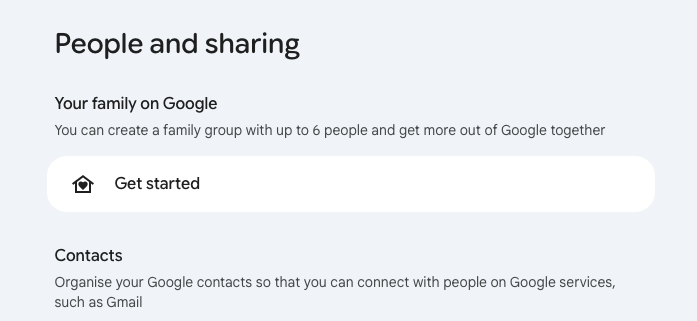
01 · Check your Family
Open the Family page with the email you intend to use and check your current role. Family member and Full Family have different requirements:
Family member · receive the shop’s invitation
Your email must be eligible to join the shop’s Family. If you are in another group, check with the admin before leaving: Google applies a 12-month Family switching restriction.
Full Family · you invite the shop’s account
You may keep an existing Family if you manage it and have room to invite the shop’s subscription account. You do not need to delete or recreate the group. If you are a member of someone else’s Family, check with the admin before making changes.
This example shows an account without a Family and a “Get started” button. For Full Family, an existing Family you manage does not need to show this screen or be deleted and recreated.Enlarge this guide image
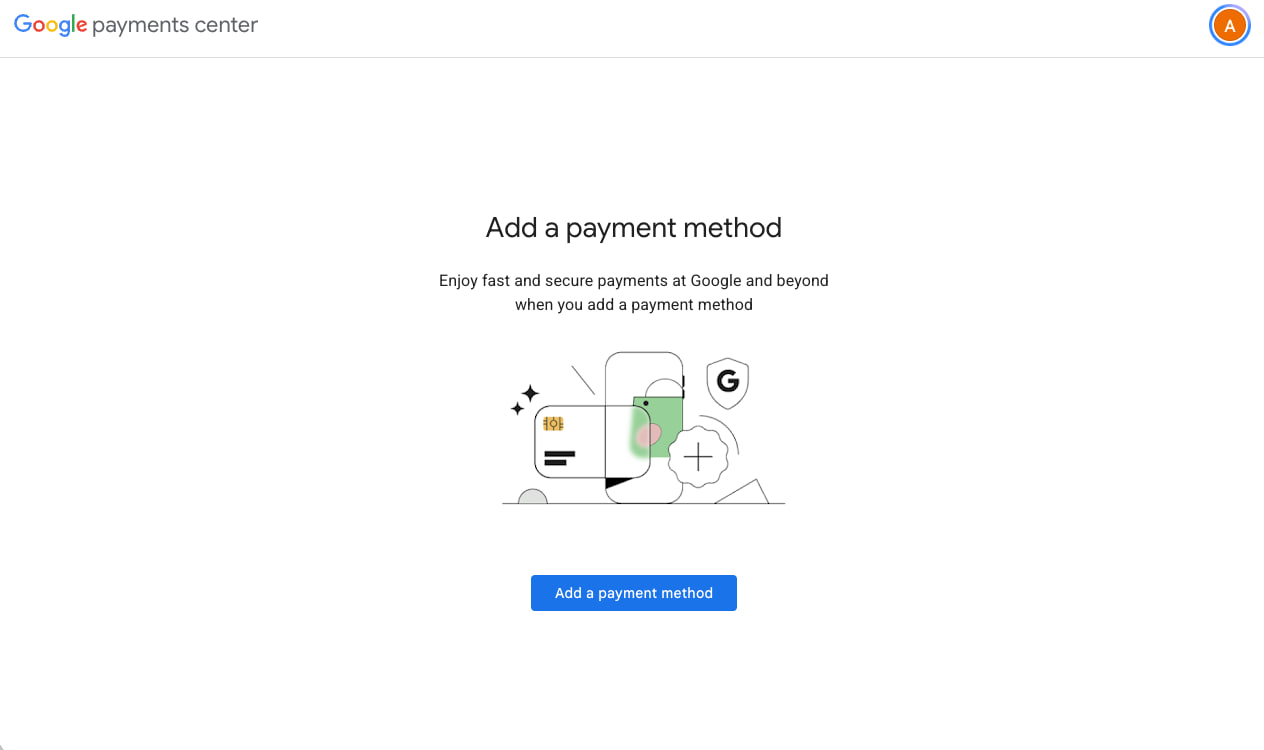
02 · Check payments
Check your payments profile and active Google subscriptions. Close the profile only after you understand the effect and the admin has guided you. If you cannot close the payments profile, you must prepare a different Gmail account to register.
This example shows no saved payment method. Removing a card or having no card does not mean the payments profile is closed.Enlarge this guide image
Closing a payments profile permanently removes its transaction/payment information, and that profile cannot be reopened. It affects Google purchases; read the official guidance before confirming.
Choose Family member (25,000 credits/month) for 1, 3 or 6 months; view prices in Plans and confirm in the Telegram bot. Check video generation, the Family/payments requirements and email-change terms before sending your email, confirming the order and paying.
The shop sends a Family invitation to your registered email. When the bot reports “Done”, check your inbox and spam folder, then join or contact the admin within 24 hours.
Open the invitation with the correct email, accept it and check Ultra 20x benefits and video generation. Report any problem to the admin promptly; do not create a new Family when joining Family member.
Keep your activation confirmation, plan start/end dates and order details. Use your registered email when requesting support.
5-member Full Family · you manage the Family
Choose 3, 6 or 12 months and check the current price in the Telegram bot. Confirm the order details; after purchase, the bot sends the shop’s subscription email.
If you already manage a Family, keep it and invite the shop’s subscription account into an available position. If you do not have a Family, create one with your eligible personal email. If you are a member of someone else’s group, check with the admin before making changes.
Send your Family manager email to the admin for activation checks and warranty registration. Check Ultra 20x benefits and the plan start/end dates.
Invite up to 4 members you manage. Add/remove those members subject to Google’s rules; do not remove the shop’s subscription account.
Managing Family members is different from owning the Ultra subscription: the shop’s supplied account maintains the plan.
Warranty by plan
Shared Family 25,000-credit plans are covered for the full term: Family member for 1, 3 or 6 months; Full Family for 3, 6 or 12 months. The 100,000 credits and Unlimited Credit plans have their own terms below, and each plan page states its warranty. The Personal Ultra 20x 12-month plan: only the service plan is warranted, not the account and not Google's plan-policy changes.
1 monthFamily member
3 monthsFamily member & Full Family
6 monthsFamily member & Full Family
12 monthsFull Family and the Personal Ultra 20x 12-month plan
For shared Family 25,000-credit plans, coverage matches the purchased term: 1, 3 or 6 months for Family member; 3, 6 or 12 months for Full Family. The Personal Ultra 20x 12-month plan: only the service plan is warranted, not the account and not Google's plan-policy changes.
The start and end dates are confirmed in your order details. Keep this confirmation to check your coverage period.
For support, send the order reference/details, registered email and screenshots of the issue to the admin. For a Full Family, provide the registered Family manager email; hide sensitive information in screenshots.
For an issue covered by the warranty, the shop refunds only if it cannot restore the plan. Every refund is calculated on the unused time.
100,000-credit plan: Credits are a pool shared by the whole Family, delivered in 25,000-credit batches; the shop refills each batch when it runs out, up to 100,000 credits. The plan ends after 1 month or when all 100,000 credits are used, whichever comes first. Tell the shop through the bot when credits are nearly out. Refills run 10:00–21:00 GMT+7, with 2–3 hours between refills. The shop tracks credits used from when the bot says “Done”; ask the bot for the usage total.
Unlimited Credit plans: if the problem comes from the shop’s account, the shop restores the plan or arranges a replacement account; if it cannot, it refunds the unused time. For Full Family Unlimited Credit, problems with your own Gmail are not covered.
Keep access to your personal email and keep the shop’s subscription account in the Family. Full Family warranty exclusions are shown directly below the plans. No fee is charged when warranty service is declined.
BEFORE YOU JOIN
Clear answers before you choose
Understand members, shared resources, activation and warranty.
Am I buying Ultra x5 or Ultra 20x?
Both Family member and Full Family on this page are Google AI Ultra 20x. Family member is one member in the shop's Family; Full Family is 5 customer-managed members. The 25,000 monthly Flow credits and 30 TB are shared Family resources, not multiplied by the number of members. The Personal Ultra 20x 12-month plan: The 25,000 monthly credits and 30 TB belong to your plan; you can invite up to 5 more people into your family group to share them.
Does 20x mean unlimited use of everything?
No. 20x describes the Gemini usage tier compared with Google AI Pro. Features, models and services retain their own limits, and demanding tasks can consume more usage. Flow still costs credits, and no separate Antigravity quota is guaranteed per member.
Can I use Antigravity? Is the Gemini 4 Argon model included?
Yes. Antigravity works with this plan, and Google’s latest models, including Gemini 4 Argon, are supported. Usage still follows Antigravity quotas and Google’s policies.
What does the 80–90% saving mean?
This is an indicative range supplied by the shop, depending on plan and term, after comparing equivalent usage periods with a direct Google AI Ultra 20x subscription. Not every order saves exactly 90%. Current prices are in the bot; a shared Family plan does not include every benefit of a dedicated subscription. Compare pricing and scope before paying.
For single-member plans (Family member, 750,000 credits, 100,000 credits, Unlimited Credit (1 member)), the shop covers each plan under its own terms but does not promise an email change for customer-side issues. An email change is a separate service costing 50,000 VND per approved change. The shop may decline, even if the old email is still in the Family with Ultra; there is no fee if declined. Wait for the admin to check and confirm; changes are not automatic.
For single-member plans that join the shop's Family (not the Personal Ultra 20x 12-month plan): once the shop sends the invitation and the bot says “Done”, check your inbox and spam, then join or report a problem to the admin within 24 hours. If you have not joined or replied after 24 hours, the case is treated as customer-side and follows the email-change policy: the shop reviews it and may decline; an approved change costs 50,000 VND.
Are the prices on this page final? Where do I order?
Each product card shows the listed VND price for the full term; USD amounts are reference conversions. Open a plan to see its conditions and step-by-step guide, then confirm in @chugax_gl_bot on Telegram: the bot confirms the final amount and payment method. This website does not create orders or take payments.
For Full Family plans, warranty is declined if the Family manager account cannot be accessed to verify the plan, if the customer removes the shop’s subscription account, or if a disabled manager account is restored but the Family loses Ultra. These cases appear in the Important section below the plans. No fee is charged when warranty service is declined.
Family member covers one email joining a shop-managed Family. Full Family covers five customer emails: you manage the Family and invite four others. Both receive shared Ultra 20x benefits. The main differences are account count and group management, not a separate Ultra subscription for each Full Family user. The Personal Ultra 20x 12-month plan: The shop prefers to upgrade the Gmail you already use; if needed, you can receive a Gmail account with the plan already active, provided by the shop. Message the shop right after you order to get the best guidance for setting it up.
Why must the shop’s email stay in my 5-member Full Family?
The Family has six positions: you as manager, four members you invite, and the subscription account provided by the shop. That account maintains Ultra sharing. You manage your four members but must keep the subscription account in the group. Managing the Family does not make you the owner of the shop account’s subscription.
Are credits per person or for the whole group?
On 25,000-credit plans, 25,000 Flow credits per month are shared by the whole Family, not 25,000 per member; they reset each plan cycle and do not roll over. The 750,000-credit plan refills to 25,000 credits every day with no rollover. 100,000-credit plan: Credits are a pool shared by the whole Family, delivered in 25,000-credit batches; the shop refills each batch when it runs out, up to 100,000 credits. The plan ends after 1 month or when all 100,000 credits are used, whichever comes first. Unlimited Credit plans are refilled whenever credits run out. Credits per generation depend on the model and feature in Flow. The Personal Ultra 20x 12-month plan: The 25,000 monthly credits and 30 TB belong to your plan; you can invite up to 5 more people into your family group to share them.
Is there a zero-credit video model?
Only the Personal Ultra 20x 12-month plan includes Veo 3.1 Lower Priority for video without spending credits. The other plans do not include the Veo Lite / Lower Priority model; each generation spends credits according to the model selected in Flow. “Unlimited Credit*” means the shop refills credits whenever they run out, between 10:00 and 21:00 GMT+7, 2–3 hours apart. Credits work with Veo 3 and Gemini Omni Flash. YouTube Premium and the USD 100 monthly Google Cloud credit are also only in the Personal Ultra 20x 12-month plan.
Is 30 TB just for me? Can others see my files?
The Family shares 30 TB for Drive, Gmail and Photos; it is not 30 TB per email. Sharing storage does not automatically share your files. Others only see files you give them access to. Family members can see each other’s names, emails and storage usage. The Personal Ultra 20x 12-month plan: The 25,000 monthly credits and 30 TB belong to your plan; you can invite up to 5 more people into your family group to share them.
Which terms are available? How long is the warranty?
Family member (25,000 credits/month) is available for 1, 3 or 6 months; Full Family (25,000 credits/month) for 3, 6 or 12 months. The 750,000 credits, 100,000 credits and Unlimited Credit plans (1 or 5 members) last 1 month; the Personal Ultra 20x 12-month plan has a 12-month term. 25,000-credit plans are covered for the full term. 100,000-credit plan: Credits are a pool shared by the whole Family, delivered in 25,000-credit batches; the shop refills each batch when it runs out, up to 100,000 credits. The plan ends after 1 month or when all 100,000 credits are used, whichever comes first. The shop tracks credits used from when the bot says “Done”; ask the bot for the usage total. Unlimited Credit plans: if a shop-side issue occurs, the shop restores the plan, or refunds the unused time if it cannot. Confirm the warranty scope of the 750,000-credit plan in the bot. Start and end dates are recorded in your order. The Personal Ultra 20x 12-month plan: the shop warrants only the service plan, not the account and not changes Google makes to the plan.
What if I already have a Family or payments profile?
Family member: your email must be eligible to accept the shop’s Family invitation. If you belong to another group, check with the admin before leaving because Google restricts Family switching. Full Family: keep your existing Family if you manage it and have room to invite the shop’s subscription account; there is no need to delete and recreate it. If you are only a member of another group, check your role first. Do not close a payments profile without understanding the effects; having no card does not mean it is closed.
How long does activation take? What should I send for support?
Plan upgrades are processed within 1–3 days after the shop receives complete details and confirms payment. Use an eligible email. Before sending your email, check that it can generate videos and review the Family/payments requirements. For an issue, send order details, your registered email, the time and an error screenshot to the admin; never send passwords or OTPs.
Awards, rankings and recognition from creative competitions and programmes on Shakker AI and TensorArt.
AWARDS & RECOGNITION OVERVIEW20
entries documented in the profile
Includes prizes, rankings and community/participation recognition. NETFLUX placed Top 5; the Top 2 label in the older overview image has not been updated.
Information and links are taken from the ChugAx profile for your reference before purchasing. Professional recognition is not Google reseller certification or an endorsement of this service.
Ready to choose your plan?
Check the price in the bot and confirm your plan and warranty terms before transferring payment.
International bank nameMilitary Commercial Joint Stock Bank (MB Bank)
Account Number
6118506159376
Account holder (without accents)
Pham Dang Chung
Contact phone number
0336788856
MB general SWIFT/BIC code
MSCBVNVX
If the app requires 11 characters: MSCBVNVXXXX (head office).
This is MB's general code. If your app requires a branch code or bank address, confirm it with MB and the bot before sending.
Pay with MoMo
Separate e-wallet method
MoMo wallet
0336788856
Use MoMo only if the bot confirms it; send Wise/Revolut transfers to MB Bank.
After transferring, please send the receipt via Zalo: 0336788856.
Upgrade timing: 1–3 days. Counted from when the shop receives complete details and confirms payment. Use an eligible email.
Send your registered email, plan name and purchased term so the shop can match your order.
For the Full Family, the admin records your Family manager email for warranty support.
For any questions, feel free to message us.
USDT bilan to‘lov · TON tarmog‘i
To‘lovdan oldin @chugax_gl_bot orqali buyurtma, yakuniy USDT summasi va hisobingiz mosligini tasdiqlang.
Tarmoq
TON
Aktiv
USDT
Qabul manzili
UQBoikkTBg1OYNyE2oytkphyW61WAaaEV1qYW_zJMgTnkfcP
Faqat TON tarmog‘ida USDT yuboring. Boshqa tarmoq, TON tokeni, NFT yoki smart-kontrakt orqali yubormang. O‘tkazishdan oldin manzilni botdagi ma’lumot bilan solishtiring; to‘lovdan so‘ng chekni botga yuboring.
Global payments through our Telegram bot
Choose the exact product and term in @chugax_gl_bot. The bot provides the order amount, available method and payment instructions.
Check the asset, network and receiving details shown in the bot before transferring. Upgrade timing is 1–3 days after the shop receives complete details and confirms payment.
Pay only after the bot confirms your email is eligible. Country rules: Family member plans need a Vietnam IP when you accept the invitation; Full Family plans need your country declared, and invited members must meet the same-country requirement.
Pay from Brazil with Wise or Revolut
Choose the product and term in @chugax_gl_bot. Confirm the final VND amount and account eligibility before paying.
In Wise, choose a VND transfer to a Vietnam bank account and select Military Commercial Joint Stock Bank (MB Bank). Check the account holder and number above.
In Revolut, check whether a VND bank transfer to Vietnam is available. If it asks for SWIFT/BIC, use MB's general code above; check with the bank if the app requires a branch-specific code.
MoMo 0336788856 is a separate option: use it only if the bot confirms a compatible transfer channel. Do not treat the Vietnamese bank QR as Wise or Revolut instructions.
Check fees, exchange rate and recipient name in the app before confirming. Send the receipt and order details to the bot. Activation takes 1–3 days after payment and complete details are confirmed.
Pay only after the bot confirms your email is eligible. Country rules: Family member plans need a Vietnam IP when you accept the invitation; Full Family plans need your country declared, and invited members must meet the same-country requirement.
Videos
Google AI Tutorial Videos
Selected Vietnamese-language videos from Duy Luan De Thuong and Thai Van Linh Skills Bridge to learn Gemini, NotebookLM, AI Studio, and combined workflows.




 Veo 3, Omni Flash
 Antigravity





 NotebookLM
 Google Drive
 Docs
Docs Photos